
Disclosure: This page may contain affiliate links. Prices were checked on the date shown and may change.
An introduction to Blue Cat Audio Blue Cat's Miaow Wah, based on information from the maker and distributors: what it does, how to use it and who it may suit. It is not scored.
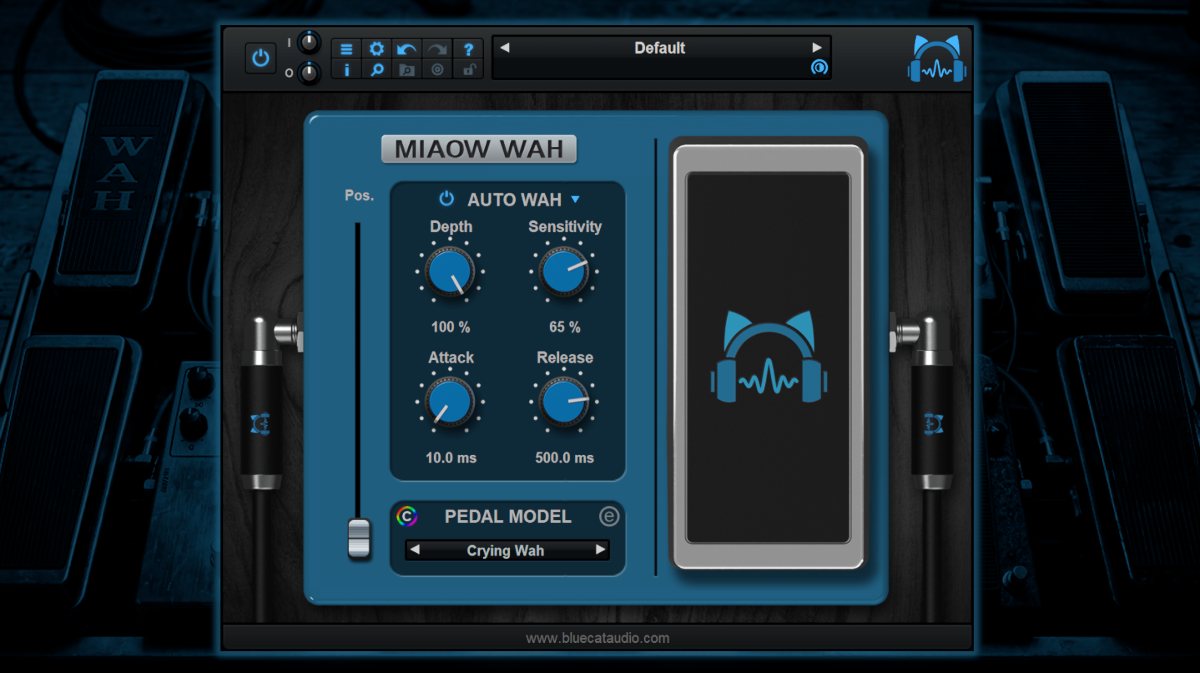
Blue Cat's Miaow Wah is an augmented virtual Wah pedal plug-in, capable of simulating a wide range of Wah pedals, auto filters, modulation effects and more.
— Blue Cat Audio official site
What is Blue Cat's Miaow Wah?
Blue Cat's Miaow Wah is an effect plug-in from Blue Cat Audio that turns the wah pedal into software. The official description calls it an augmented virtual wah that can simulate a range of wah pedals and also work as an auto filter or modulation effect.
It ships with 29 predefined wah models from different eras. The filter can be controlled manually with an expression pedal, automatically from the strength of the input signal in auto mode, or by an LFO.
A Tone Maps browser and a built-in wah editor are provided for making your own wah from factory presets. Because filters and control options can be defined freely, the concept stretches to flanger-like tones, univibes, phasing effects and filtered tremolos, according to the maker.
It is offered in the main plug-in formats for Mac and Windows, with full MIDI control and MIDI Learn. The same effect is also built into Blue Cat's Axiom, the multi-effects processor for guitar and bass.
Key features
29 wah models
Twenty-nine predefined models cover wah pedals from different eras. You can switch between them to suit the track, which may make comparing them easier than owning many pedals.
Three ways to move the filter
Manual control with an expression pedal, envelope-follower auto mode and an LFO mode are available. This lets you play it live, let it follow the signal, or sweep it in time with the song.
Built-in wah editor
An editor lets you build your own wah starting from the factory presets, which may help when you want to reshape the character of the filter.
Tone Maps explorer
The Tone Maps explorer lets you browse sounds on a map-like view, which may help when preset names alone do not tell you much.
Beyond a plain wah
Custom filters can be defined, so the effect extends to flanger-like tones, univibes, phasing effects and filtered tremolos, and can be tried on sources other than guitar.
Tempo sync and MIDI
The LFO can sync to the host. MIDI control, automation and MIDI Learn are supported, and version 1.1 adds control of all parameters from MIDI notes, pitch bend and more.
Light on CPU
Processing shuts down when the input is silent to save CPU. The interface can be customized with transparency and zoom, and smooth bypass plus undo and redo are included.
Specifications
| Item | Details |
|---|---|
| Type | Wah pedal simulator / modulation effect |
| Wah models | 29 predefined |
| Presets | More than 200 |
| Control | Expression pedal / auto (envelope) / LFO |
| Formats | VST, VST3, AAX, Audio Unit (Mac) |
| OS | Mac: macOS 10.9 or newer (Intel or Apple Silicon); Windows: Vista, 7, 8, 10, 11 |
| Demo | Available (limited instances; regular short bypasses) |
What is included and system requirements
- The plug-in (Mac / Windows)
- More than 200 presets and Tone Maps
- Demo available to download
- User's guide on the official site
How to use it
- Download the demo or purchased version from the official site and install it.
- Insert Miaow Wah on a guitar or synth track in your DAW.
- Pick a wah model from the presets or Tone Maps.
- Set the control source to an expression pedal, auto or LFO.
- In auto mode, adjust how it responds to the strength of the input.
- In LFO mode, turn on tempo sync and set the rate.
- Save settings you like as a preset.
- For a custom motion, edit the filter in the wah editor.
Where it may come in handy
Guitar and bass wah
Instead of rocking a pedal, the filter can be driven by an expression pedal, the input level or an LFO. It may let you try anything from manual wah playing to automatic auto-wah.
Synth and drum movement
Because the filter shape can be edited, it may also add motion to synth leads or drum loops.
Univibe and phaser-style motion
The official description says it can produce flanger-like tones, univibes, phasing effects and filtered tremolos, which may suit guitar or keyboard parts that need movement.
Starting from presets
With more than 200 presets and the Tone Maps explorer, you may be able to audition ready-made sounds without knowing every setting in advance.
Who it may suit
- Those who want a wah on guitar or bass inside the DAW.
- Players without a pedal who want to try wahs from several eras.
- Anyone who likes to design their own filter motion.
- Producers who want a moving filter effect on synths or drums.
Good to know before you buy
- The demo limits the number of instances and bypasses the plug-in for a few milliseconds regularly.
- Official requirements: Mac OS 10.9 or newer (Intel or Apple Silicon) and Windows with a 64-bit VST/AAX host.
- To play it like a pedal you need a separate controller such as an expression pedal.
Price
Please check the official page for the price.
See Blue Cat's Miaow Wah on the product page
More of the same kind
Other introduction articles of the same kind.
- Mastering The Mix ANIMATE
- Waves Bass Rider
- W. A. Production MixBoss
- Waves Retro Fi
- Serato Serato Pitch 'n Time Pro
- Waves Maserati GTi
We have introduced 21 other products from Blue Cat Audio.
- Blue Cat Audio AcouFiend
- Blue Cat Audio Hot Tuna
- Blue Cat Audio Blue Cat's Remote Control
- Blue Cat Audio Blue Cat's DP Meter Pro
- Blue Cat Audio Blue Cat's Connector
See the full list in Product database: Effects.
Sources: bluecataudio.com pluginboutique.com (checked 2026-10-27)










Comments