
Disclosure: This page may contain affiliate links. Prices were checked on the date shown and may change.
An introduction to Wave Arts Dialog 2, based on information from the maker and distributors: what it does, how to use it and who it may suit. It is not scored.
Post production for speech and voice
— Wave Arts official site
What is Dialog 2?
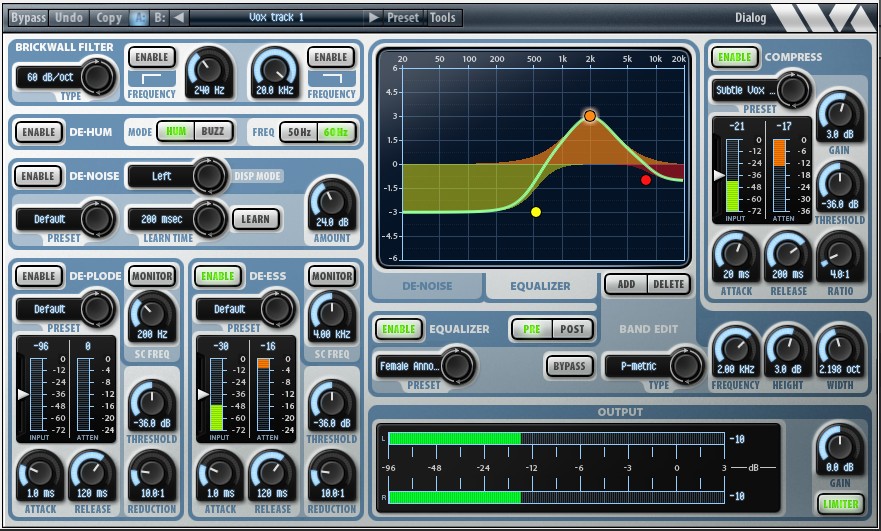
Wave Arts Dialog 2 is a post-production plug-in for cleaning up spoken voice. The maker's page says it suits voice-over, film and TV recordings on location or sound stage, and broadcast. It combines the processing needed to clean up, adjust and sweeten the voice in one plug-in.
Brickwall filters with variable rolloff slopes cut low or high frequencies. The de-hum processor uses notch filters to remove 10 harmonics of 50 or 60 Hz hum, the de-buzz processor squelches line-frequency buzz, and the de-noise processor uses the MR Noise algorithm for broadband noise reduction.
It also has a 10-band EQ with 11 filter types, a De-plode function for plosives or wind rumble, a De-ess function for sibilance, and master and per-section preset managers. Processing is 64-bit.
Key features
Hum, buzz and noise removal
Separate processors reduce 10 harmonics of 50/60 Hz hum, buzz and broadband noise.
Brickwall filters
Low and high cut filters with selectable rolloff slopes.
10-band EQ
A 10-band EQ with 11 different filter types.
De-plode
Attenuates plosives and wind rumble.
De-ess
Attenuates sibilance.
Preset management
A master preset manager and a preset manager per section.
Specifications
| Item | Details |
|---|---|
| Formats | Mac: AU, VST3, AAX (macOS 10.13 or later; AAX needs Pro Tools 11 or later). Windows: VST2, VST3, AAX (AAX needs Pro Tools 10.3.5 or later, or 11 or later, depending on the product) |
| Main features | Hum, buzz and noise removal, Brickwall filters, 10-band EQ, De-plode |
What is included and system requirements
- Dialog 2
- Formats: AU, VST3, AAX (Mac), VST2, VST3, AAX (Windows)
How to use it
- Insert Dialog 2 on the voice track.
- Use de-hum and de-buzz if there is hum or buzz.
- Reduce broadband noise with the de-noise processor.
- Tame plosives and sibilance with De-plode and De-ess.
- Shape tone with the EQ and save a preset.
Where it may come in handy
Voice-over
The first use the maker names.
Film and TV location sound
Described as suiting cleanup of dialogue recorded on location or on a stage.
Broadcast and podcasts
Broadcast is also named as a use.
Who it may suit
- People who want to clean and adjust speech in one plug-in
- People tidying dialogue in post-production
Good to know before you buy
- This article is based on the Wave Arts product page. Check the maker or retailer pages for the latest specifications and prices.
Price
Please check the official page for the price.
See Dialog 2 on the product page
More of the same kind
Other introduction articles of the same kind.
- Karanyi Sounds Cloudmax 3
- Rhodes V-Pan
- New Audio Technology Spatial Sound Card – Spatial Sound Card Pro
- Waves Key Detector
- MeldaProduction MMicSim
- Waves Maserati GRP
We have introduced 8 other products from Wave Arts.
- Wave Arts Panorama 7
- Wave Arts MultiDynamics 7
- Wave Arts FinalPlug 7
- Wave Arts Tube Saturator 2
- Wave Arts Convology XT
See the full list in Product database: Effects.
Sources: wavearts.com (checked 2026-11-09)









Comments