
Disclosure: This page may contain affiliate links. Prices were checked on the date shown and may change.
An introduction to Waves Curves AQ, based on information from the maker and distributors: what it does, how to use it and who it may suit. It is not scored.
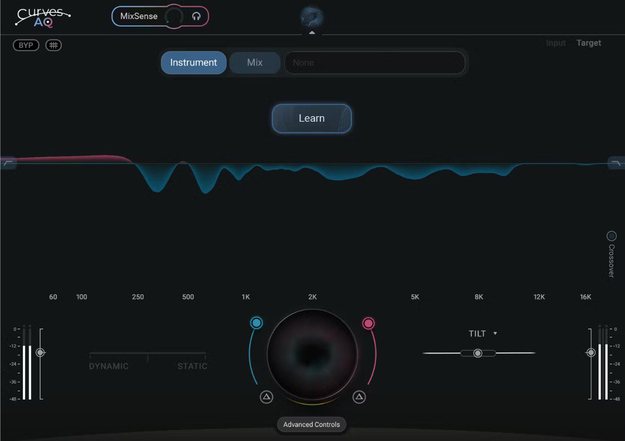
AQ learns your audio, decides what sound it should have and creates 5 unique EQ profiles you can choose from.
— Waves official site
What is Curves AQ?
Curves AQ is an equalizer that Waves describes as the world's first autonomous EQ. You let it learn your audio and it builds an EQ curve to suit that sound.
After learning, AQ offers five EQ profiles based on the character of the signal. Rather than applying a fixed preset, it creates the curves from the input itself, whether a vocal, an instrument or a full mix.
You can use a generated curve as it is or refine it with five EQ controls. These include adjusting the balance between static and dynamic EQ and treating boosts and cuts separately.
MixSense changes the amount of processing according to the context of the mix, and Smart Tilt balances the overall tone. A zero-latency version, Curves AQ LIVE, is included.
Key features
Learns and proposes five curves
Press Learn and play audio, and AQ analyzes the input and builds five EQ profiles. It may serve as a starting point when you are unsure where to begin with EQ.
Original curves generated with AI
Waves says the curves are generated from the audio's spectrum rather than taken from fixed presets. It can be used on vocals, instruments or full mixes.
MixSense
This function adjusts the amount of processing in the context of the mix. It may help when you want to EQ while keeping other tracks in mind.
Static versus dynamic EQ
You can freely set the ratio between static EQ and dynamic EQ that responds to level, mixing always-on cuts with processing that acts only when needed.
Independent boost and cut
Overall and per-band amounts can be set separately for boosts and cuts, for example gentle boosts with stronger cuts.
Smart Tilt and Offset
Smart Tilt balances the overall tonal tilt. Offset shifts the curve along the frequency axis to move the focal point of processing.
Zero-latency Curves AQ LIVE
The included LIVE version has no latency, which may suit streaming or live-oriented use.
Specifications
| Item | Details |
|---|---|
| Mac OS | macOS 12 Monterey to 15 Sequoia |
| Windows OS | Windows 10 or later |
| Mac formats | VST / AU / AAX |
| Windows formats | VST / AAX |
| License | Registered to a Waves account |
What is included and system requirements
- Curves AQ
- Curves AQ LIVE (zero-latency version)
- Mac: macOS 12 Monterey, 13 Ventura, 14 Sonoma, 15 Sequoia; VST, AU, AAX
- Windows: Windows 10 or later; VST, AAX
How to use it
- Create a Waves account and register the serial number shown in your Plugin Boutique account.
- Download and open Waves Central, then log in with your account.
- Select the purchased product and install it.
- Start your DAW and rescan plug-ins so the new product appears.
- Open the plug-in on an insert of a track or bus.
- Call up a preset and begin adjusting from there.
- Compare with the original sound and move only the settings you need.
- Save the settings you like with your project.
Where it may come in handy
Shaping a vocal tone
You might train it on a vocal take, choose the closest of the five curves, and then refine boosts and cuts.
Checking overall balance
It could be placed on a mix bus, using Smart Tilt for overall balance and MixSense to match processing to context.
A starting point for those new to EQ
When you are not sure what to touch, AQ's suggestion can be a base that you adjust afterward.
Who it may suit
- People unsure where to start with EQ
- People who want to finish vocal or instrument EQ quickly
- People who want static and dynamic EQ in one curve
- People who also want a zero-latency EQ for streaming
Good to know before you buy
- You create a Waves account, register the serial number from your Plugin Boutique account, and install through the Waves Central app.
- Waves products are also offered through subscription plans in addition to perpetual licenses.
How it differs from similar products
We do not pick a winner; the official figures are placed side by side.
Waves H-EQ Hybrid Equalizer
Curves AQ builds five curves by learning the audio, while H-EQ lets you choose one of seven console-inspired filter types per band. H-EQ has five parametric bands plus high-pass and low-pass bands.
Price
$129.99 (Plugin Boutique, checked 2026-10-27). Prices can vary by region and promotion, so check the official page before buying.
See Curves AQ on the product page
More of the same kind
We have introduced 122 EQs. Here are some of the others.
- Antelope Audio VEQ-STU 089
- Antelope Audio VMEQ-5
- Pulsar Audio 8200 Analog Parallel Equalizer
- Pulsar Audio Pulsar 8200
- Zynaptiq UNFILTER
- Stagecraft Software Parity EQ
We have introduced 215 other products from Waves.
- Waves PuigTec EQs
- Waves H-EQ Hybrid Equalizer
- Waves Renaissance Equalizer
- Waves Manny Marroquin EQ
- Waves API 550
For a side-by-side comparison scored on the same criteria, see our comparison of EQs.
See the full list in Product database: Effects.
Sources: pluginboutique.com (checked 2026-10-27)










Comments