
Disclosure: This page may contain affiliate links. Prices were checked on the date shown and may change.
An introduction to Waves Silk Vocal, based on information from the maker and distributors: what it does, how to use it and who it may suit. It is not scored.
Silk Vocal is a smart EQ & dynamics processor that takes your vocals from raw all the way to balanced and mixed.
— Waves official site
What is Silk Vocal?
Silk Vocal is a smart EQ and dynamics processor from Waves for vocals, aimed at taking a raw recording closer to a balanced mix-ready state.
It detects resonances across 2,000 analysis bands and its engine decides where and when to process, while you decide how much.
It is described as handling boominess, harshness and sibilance without needing several separate plug-ins.
A license for Silk Vocal Live, a real-time version, is included. Male and female voice modes and linear phase curves are provided.
Key features
Automatic resonance detection
It scans 2,000 analysis bands and decides where and when to process, which may reduce the time spent hunting for problem frequencies.
Boominess, harshness and sibilance
It is presented for taming boominess, harshness and sibilance.
Male and female voice modes
Modes are available to suit the voice type.
Linear phase curves
Linear phase processing curves are included.
Silk Vocal Live included
A license for the real-time version is included, which opens up live use.
Rich controls
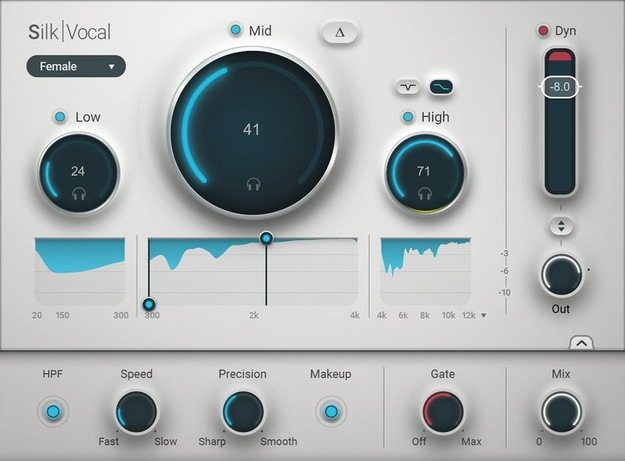
High pass filter, gate, mix, band solo and bypass, Delta, Speed and Precision controls are included, along with adjustable midrange tuning.
Specifications
| Item | Details |
|---|---|
| Type | Vocal EQ / dynamics |
| Analysis bands | 2,000 |
| Included | Silk Vocal Live (real-time version) |
| Plug-in formats (Mac) | VST, AU, AAX |
| Plug-in formats (Windows) | VST, AAX |
| Supported OS (Mac) | macOS Monterey 12, Ventura 13, Sonoma 14, Sequoia 15 |
| Supported OS (Windows) | Windows 10 or later |
What is included and system requirements
- Silk Vocal plug-in
- Silk Vocal Live license (real-time version)
- Formats: VST, AU, AAX on Mac; VST, AAX on Windows
How to use it
- Buy from a retailer and install.
- Rescan in your DAW and insert Silk Vocal on the vocal track.
- Choose the male or female voice mode.
- Play the vocal and adjust the amount.
- Use Delta to listen to what is being removed.
- Adjust Speed and Precision to shape behavior.
- Add the high pass filter or gate if needed.
Where it may come in handy
Cleaning up a raw vocal
At the start of a mix, it may help tame boominess and harshness together.
Reducing sibilance
It may be an option for sibilant vocals before other processors.
Live use
The included Live version may suit real-time work.
Who it may suit
- People who want fewer steps in vocal mixing
- Anyone bothered by boomy or harsh vocals
- Those looking for vocal processing usable live
Good to know before you buy
- Requirements are macOS 12 to 15 and Windows 10 or later.
- One review on the retailer page says it fits specific use cases.
Price
Please check the official page for the price.
See Silk Vocal on the product page
More of the same kind
We have introduced 122 EQs. Here are some of the others.
- Stagecraft Software Parity EQ
- Antelope Audio NEU-PEV
- MeldaProduction MFreeformAnalogEq
- DDMF ColourEQ
- McDSP AE400 Active EQ Native v7
- PSP Audioware PSP ConsoleQ
We have introduced 215 other products from Waves.
- Waves Q10 Equalizer
- Waves Q-Clone
- Waves API 550
- Waves Linear Phase EQ
- Waves Abbey Road RS56 Passive EQ
For a side-by-side comparison scored on the same criteria, see our comparison of EQs.
See the full list in Product database: Effects.
Sources: pluginboutique.com (checked 2026-10-27)










Comments