
In a cover song, the pitch may be right but the vocal can still sound slightly off from the backing track. That is rhythm and timing drift. This article explains how to think about fixing the timing of a vocal, and the steps, using “Quantize Time” in Celemony’s official help as the example.
Disclosure: This article contains affiliate links. If you buy through them, SoundBounty may earn a commission at no extra cost to you. Information is as of the date we checked it and can change.
Key points
- Timing correction is the work of moving the “start” of notes to match the rhythm of the song.
- With the intensity at 100%, it lines up exactly. At 50%, it moves only halfway.
- Setting the intensity a little low keeps the looseness that sounds like a person singing.
- Consonants (such as “s” sounds) are handled more naturally if treated separately from vowels.
- After fixing, check by listening together with the backing track.
What timing correction is
If the timing of a vocal is slightly earlier or later than the backing track, the vocal sounds as if it is leaning forward or dragging. Fixing this “drift” afterward is timing correction.
It is separate work from pitch correction, which fixes pitch. You may fix both. Pitch correction is explained in How to do pitch correction on a cover song.
Melodyne’s idea: move the start of notes
When Melodyne analyzes a recording, it decides two positions for each note. One is the beat (the position in the rhythm) where the note should be. The other is the position where the note actually starts.
When you fix timing, you move the position where it actually starts toward the beat where it should be. Melodyne’s help explains that this differs from the method of snapping all notes to fixed lines like programming MIDI. For example, if you align a run of sixteenth notes to a quarter note, the start of the run moves. The spacing within the run is left as it is.
Source: Celemony official help
How to use Quantize Time
1. Select the notes you want to fix
Select the notes you want to fix. If you select nothing, all the notes are the target.
2. Open the macro
From the “Edit” menu, choose “Quantize Time” under “Quantization Macros”. You can also open it with an icon on the toolbar.
3. Decide the reference (Groove Reference)
If you choose “Auto”, the notes are aligned to the beats Melodyne analyzed. You can also use another track as the reference. For example, use it when you want the vocal to follow the movement of another part.
4. Decide the intensity
The intensity is a slider that decides, as a percentage, how far to move.
- 0%: does not move.
- 50%: moves only halfway.
- 100%: lines up exactly with the beat.
You can move it while playing. You can check not only by ear but also by the movement of the notes on screen. When you want to keep the human feel of the singing, do not set it to 100%; set it a little lower.
Source: Celemony official help
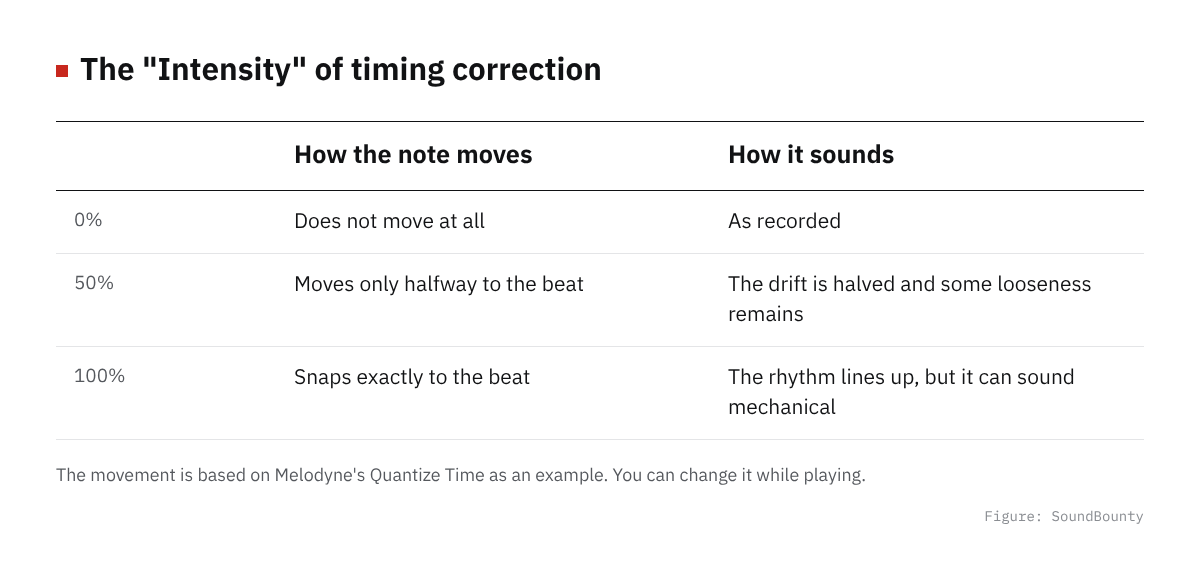
Figure: SoundBounty
Handling consonants (such as “s” sounds)
Singing has consonants such as “s”, “z” and “ch”, and sounds of breathing in. Unlike vowels, which have a pitch, the position that decides the rhythm of these is not clear.
With the “Melodic” algorithm, Melodyne finds such consonants and sets the start position of the note after the consonant. This makes the result of timing correction more natural.
If it does not fix well, separating the note at the position where the consonant ends lets you handle the consonant separately. To separate it, use the “Separation Tool”.
Source: Celemony official help
Matching to another track
You can choose another track as the reference (Groove Reference). The notes of the chosen track become the beats you align to.
For example, you can use this method when you want to match the timing of a harmony to the main vocal. How to make harmonies is explained in How to make harmonies and doubling for a cover song.
Source: Celemony official help
Tips to avoid overdoing it
- Start with a low intensity: start from around 50% and raise it if it is not enough.
- Fix only the places that bother you: when you do not need to fix the whole, select only the notes that drift.
- Notes fixed by hand are protected: by default, notes you fixed finely with the Timing Tool are not moved by the macro.
- Listen with the backing track: listening to the vocal alone makes you notice more and overdo the fixes.
There are no fixed numbers. They change with the tempo of the song and how it is sung, so decide by listening.
The plug-in to use
The functions you can use differ by edition (type) of Melodyne. Check in the maker’s comparison table which editions can use the timing function.
Score 2.6 / 5 (average of the 15 products compared: 2.8)→ See all
- Specs last checked
- 2026/09/25
- Natural result
- Pitch and timing
- Real time
- None
- Harmony and multiple tracks
- One note line at a time
- Price (store, date)
- $99 [PB, checked Oct 26]
Image: from Celemony’s official press and retailer materials
The comparison of pitch correction plug-ins is in our pitch correction plug-in comparison. How to install and authorize a plug-in is explained in How to install plug-ins you bought in a sale or got as a free giveaway.
Frequently asked questions
Q. Which do I fix first, pitch or timing?
There is no fixed order. Whichever you fix first, after fixing, listen again together with the backing track and check.
Q. Should I line it up exactly?
Lining up at 100% can sound mechanical. You can also set it a little lower and keep the loose feel of a person singing.
Q. Which editions can use it?
The functions you can use differ by edition. Before you buy, check in Celemony’s comparison table that the function you want is included.
Q. Can I fix notes one at a time by hand?
Melodyne has a “Timing Tool” for moving the position of notes finely by hand. One way is to fix roughly with the macro and then fix only the notes that bother you with this tool.
Q. Are there fixed settings in numbers?
They change with the song and how it is sung, so we do not give fixed values. Decide while listening.


Comments