
Disclosure: This page may contain affiliate links. Prices were checked on the date shown and may change.
An introduction to Waves V-EQ4, based on information from the maker and distributors: what it does, how to use it and who it may suit. It is not scored.
The V-EQ4, modeled after the Neve 1081, embodies the transition between these two philosophies—vintage sound, yet evolving to greater control and precision.
— Waves official site
What is V-EQ4?
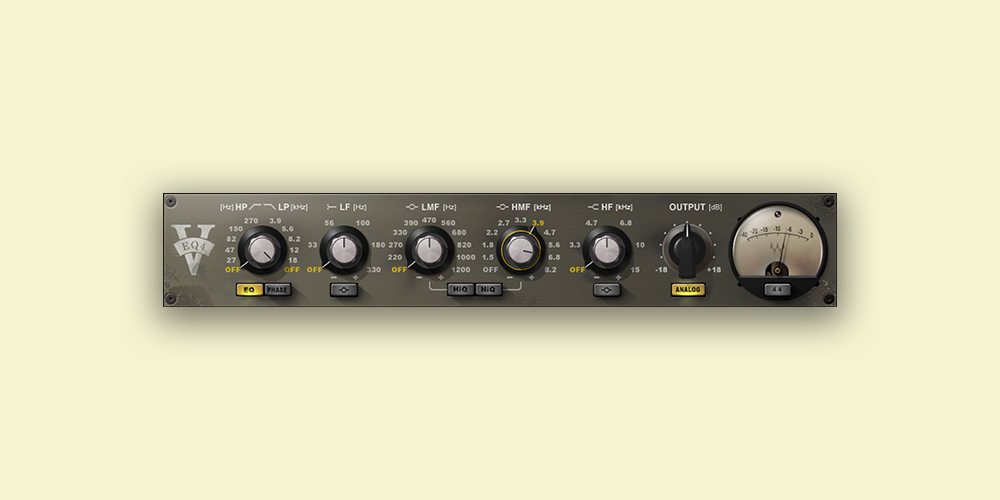
Waves V-EQ4 is an equalizer plugin modelled after the Neve 1081 mic preamp/EQ. Vintage EQs were designed to shape tone while modern ones tend to fix problems, and the V-EQ4 aims to sit between the two.
It has two 10-position midrange controls with Hi-Q buttons, variable high and low shelving, and high-pass and low-pass filters, giving range for both shaping and fixing.
Transformer modeling is said to give a warm, forward midrange. The Class AB design with analog emulation is described as adding sparkle.
Analog modeling remains active even with the EQ zeroed. It covers the frequencies needed for drums and can lift instruments out of a mix or push them back.
Key features
Neve 1081 model
Modelled on the acclaimed Neve 1081 mic preamp/EQ, a possible choice for a vintage-flavoured direction.
Two 10-position mid controls
Two midrange controls with Hi-Q buttons; low and high Q options use musical values.
Variable shelving and filters
Variable low and high shelving plus high-pass and low-pass filters for clearing unwanted ranges.
Transformer modeling
Said to give a warm, upfront midrange, which may suit adjusting presence of vocals and guitars.
Class AB design
With analog emulation, said to add sparkle in the highs.
Analog modeling at zero
Analog modeling stays active when the EQ is zeroed, worth considering when you want coloration.
Specifications
| Item | Details |
|---|---|
| Type | Neve 1081 model EQ |
| Mac | macOS Monterey 12 / Ventura 13 / Sonoma 14 / Sequoia 15; VST / AU / AAX |
| Windows | Windows 10 or later; VST / AAX |
| Main controls | Two midrange controls (10-position, Hi-Q), variable low and high shelving, high-pass and low-pass filters |
What is included and system requirements
- V-EQ4 plugin
- Authorization through a Waves account and Waves Central
How to use it
- Register the serial in your Waves account.
- Install Waves Central.
- Install V-EQ4.
- Insert V-EQ4 on a track in your DAW.
- Clear unwanted lows with the high-pass filter.
- Adjust presence with the two midrange controls.
- Shape lows and highs with the shelving controls.
Where it may come in handy
Drums
Its wide frequency coverage may suit kick and snare shaping.
Guitars and keyboards
It may suit adding rich lows and sparkling highs.
Vocal presence
The mids may help bring a vocal forward or push it back.
Analog coloration
It could be used at zero EQ for coloration.
Who it may suit
- People who want to try a Neve-style EQ
- Those wanting both tone shaping and fixing in one EQ
- Anyone shaping drums or guitars
- Existing Waves users
Good to know before you buy
- A Waves account and Waves Central are required.
- Supports macOS Monterey 12 through Sequoia 15 and Windows 10 or later.
Price
Please check the official page for the price.
More of the same kind
We have introduced 122 EQs. Here are some of the others.
- Harrison Mastering EQ
- Klevgrand GotoEQ
- Slate Digital SD-PE1
- Solid State Logic SSL X-EQ 2
- Harrison Legacy EQ
- Kuassa Kuassa EVE-AT4 Equalizer
We have introduced 215 other products from Waves.
- Waves Q10 Equalizer
- Waves PuigTec EQs
- Waves GEQ Graphic Equalizer
- Waves Abbey Road RS56 Passive EQ
- Waves API 550
For a side-by-side comparison scored on the same criteria, see our comparison of EQs.
See the full list in Product database: Effects.
Sources: pluginboutique.com (checked 2026-10-27)










Comments