
Disclosure: This page may contain affiliate links. Prices were checked on the date shown and may change.
An introduction to Waves Feedback Hunter, based on information from the maker and distributors: what it does, how to use it and who it may suit. It is not scored.
Feedback Hunter is an innovative tool designed for FOH and live sound engineers to ensure maximum gain before feedback—fast.
— Waves official site
What is Feedback Hunter?
Feedback Hunter is a feedback-control plug-in from Waves for live sound. According to the store description, it is meant to help FOH and live-sound engineers reach maximum gain before feedback occurs.
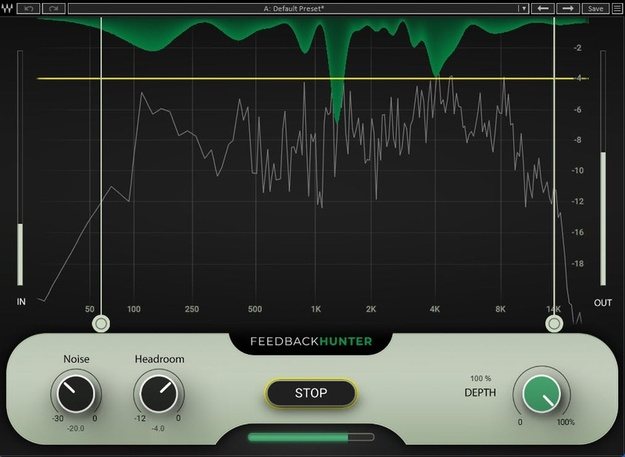
It measures the response of the microphone and the monitor or PA and creates an EQ curve that optimizes the relationship between them. The description says this shortens a setup process that used to take time on stage monitors and PA systems.
Setup is described as taking as little as 30 seconds. The description says it removes the need to ring out speakers by finding feedback frequencies one at a time. The interface is described as user-friendly, so it is aimed at more than just experienced engineers.
It is designed to be used during setup rather than during the show. The description contrasts it with Waves X-FDBK, which can be used during a live show and creates single notch bands, whereas Feedback Hunter processes the whole frequency spectrum. It supports macOS Monterey 12 through Sequoia 15 and Windows 10 or later.
Key features
Aiming for maximum gain before feedback
It measures the mic and monitor response and builds an EQ curve that optimizes their relationship, which may help when gain needs to be raised but feedback is a concern.
Less manual ringing out
The store describes it as a replacement for finding feedback frequencies one at a time with the speakers running, which may help when setup time at a venue is limited.
Setup in as little as 30 seconds
The setup process is described as taking as little as 30 seconds, with few steps so it is approachable for people less used to live sound.
Adjustable frequency range
The frequency ranges that are processed can be customized, so the range can be set to suit the source, such as focusing on the vocal band.
Works in noisy environments
The store says it works in noisy environments, so measurement may be possible even in venues that cannot be made quiet during rehearsal.
Adaptable target headroom
The target headroom, meaning the margin before feedback, can be adjusted to choose between a larger safety margin and more gain depending on the venue.
Specifications
| Item | Details |
|---|---|
| Type | Feedback control (setup tool for live sound) |
| Intended for | FOH and live-sound engineers |
| Supported OS | macOS Monterey 12, Ventura 13, Sonoma 14, Sequoia 15; Windows 10 or later |
| Plug-in formats | Mac: VST / AU / AAX; Windows: VST / AAX |
What is included and system requirements
- Feedback Hunter plug-in
- Supported OS: macOS Monterey 12 to Sequoia 15, Windows 10 or later
- Formats: VST / AU / AAX on Mac, VST / AAX on Windows
How to use it
- Install the product and activate the license, for example through Waves Central.
- Insert the plug-in on the channel that feeds the monitor or PA in the mixer or host.
- Connect the microphone and monitor combination you want to measure.
- Set the frequency range to process and the target headroom.
- Run the measurement and wait for the feedback-control EQ curve to be created.
- Check the curve and, if needed, adjust the range or headroom and run it again.
- During the show, use the curve created during setup.
Where it may come in handy
Monitor tuning at a live venue
It can be used to gain more headroom before feedback when the stage monitor level needs to be raised.
Setting up a small PA
When setup time is short, it may reduce the time spent searching for problem frequencies by hand.
Microphone setup for events and talks
For speech microphones, it could help create settings that resist feedback in each room.
Who it may suit
- Engineers who handle PA or monitors at live venues
- People who want to shorten setup time
- Staff at small events who need quick feedback control
Good to know before you buy
- It is designed for use during setup, not during the show. For problem frequencies during a show, the store description points to X-FDBK.
- Supported systems are macOS Monterey 12 through Sequoia 15 and Windows 10 or later.
- A promotional price was shown at Plugin Boutique as of October 2026.
How it differs from similar products
We do not pick a winner; the official figures are placed side by side.
Waves X-FDBK
According to the store description, X-FDBK can be used during a live show and creates single notch bands for problem frequencies, while Feedback Hunter processes the whole frequency spectrum and is designed for use during setup.
Price
Please check the official page for the price.
See Feedback Hunter on the product page
More of the same kind
Other introduction articles of the same kind.
- W. A. Production KickShaper
- United Plugins Phantomix
- Kuassa Efektor Harmonitron
- Karanyi Sounds Cloudmax 3
- accentize dxLevel
- Soundtoys Devil-Loc Deluxe
We have introduced 215 other products from Waves.
- Waves TRACT System Calibration
- Waves Doppler
- Waves Enigma
- Waves Clarity Vx DeReverb Pro
- Waves Dugan Speech
See the full list in Product database: Effects.
Sources: pluginboutique.com (checked 2026-10-27)










Comments