
Disclosure: This page may contain affiliate links. Prices were checked on the date shown and may change.
An introduction to Mastering The Mix MIXVAULT, based on information from the maker and distributors: what it does, how to use it and who it may suit. It is not scored.
MIXVAULT analyzes your audio, helps you find a great tonal balance, then lets you shape it by feel, with every move level matched.
— Mastering The Mix official site
What is MIXVAULT?
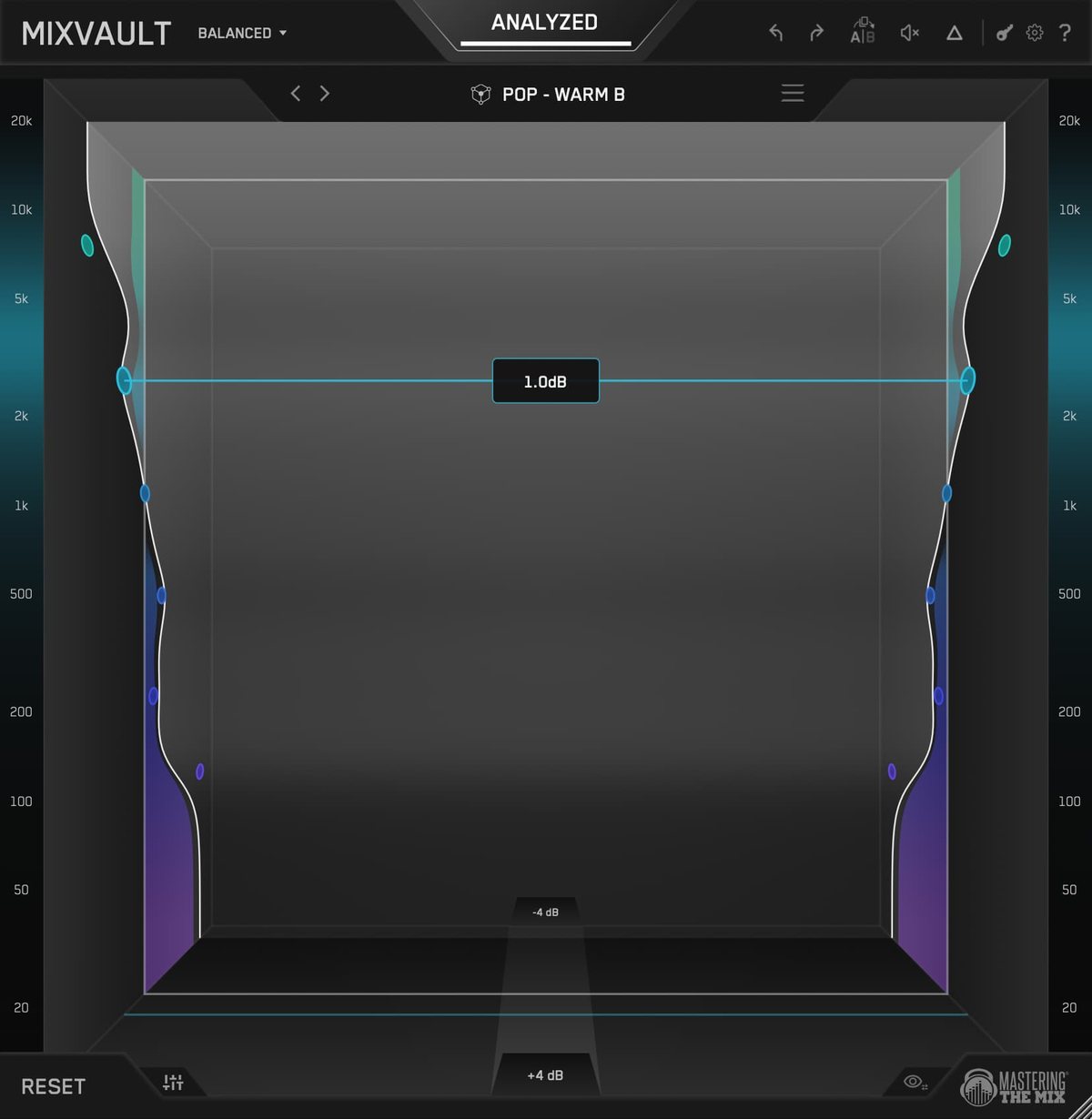
MIXVAULT is an EQ plug-in from Mastering The Mix. It analyzes your audio to create a starting point and then lets you shape frequencies by feel.
Its three-dimensional interface lets you pull a frequency toward you to make it louder or push it away to make it quieter. Every move is level matched, so changes in tone are easier to hear apart from loudness.
Press ANALYZE, choose a source (mix, vocals, bass, drums or music) and a genre, and a Smart Preset is built from your actual audio. Character labels such as dark, balanced and bright are shown.
It supports AU, VST3 and AAX on Mac (Apple Silicon native), and VST3 and AAX on Windows.
Key features
Immersive 3D interface
Pulling a frequency toward you boosts it and pushing it away cuts it, for those who prefer to work by feel.
Smart Presets
ANALYZE builds a starting point by source and genre. Arrows step through alternatives and bypass compares with the original.
Level match
Every move is loudness matched, so a change that is only louder is easier to tell apart.
Fixed, phase-stable bands
Fixed bands are designed to keep transients sharp and avoid phase smearing when boosting or cutting.
Bass mode
A mode with five bands focused on 20 to 320 Hz for shaping the low end.
Four resolution modes
Broad, Balanced, Detailed and Bass can be switched without losing your work.
Reference track import
You can load a trusted track and shape toward its tonal balance.
Specifications
| Item | Details |
|---|---|
| Type | EQ plug-in |
| Formats (Mac) | AU, VST3, AAX (Apple Silicon native) |
| Formats (Windows) | VST3, AAX |
| Mac | OS X 10.15 or higher (64-bit) |
| Windows | Windows 10 or higher (64-bit) |
| Modes | Broad, Balanced, Detailed, Bass |
What is included and system requirements
- MIXVAULT plug-in
- The official site shows a promotion that adds Mastering Essentials (EXPOSE 2, LEVELS, LIMITER)
How to use it
- Purchase and download the installer.
- Insert MIXVAULT on a track, bus or the full mix.
- Press ANALYZE and choose a source and genre.
- Step through alternatives with the preset arrows.
- Move frequencies toward or away from you to adjust.
- Compare with the original using bypass.
- Import a reference track if needed.
Where it may come in handy
Starting a mix
It may help when you want to grasp tonal tendencies before EQing.
Bass cleanup
Bass mode could be used to tidy the low end.
Matching a reference
It may suit steering the tone toward a reference track.
Who it may suit
- People who want to EQ by feel
- People who want an analysis-based starting point
- Mix creators who want to approach a reference track
Good to know before you buy
- The bands are fixed.
- The official site shows prices in pounds and Plugin Boutique in dollars.
Price
Please check the official page for the price.
See MIXVAULT on the product page
More of the same kind
We have introduced 122 EQs. Here are some of the others.
- Waves GEQ Graphic Equalizer
- Waves PuigTec EQs
- Harrison Legacy EQ
- Antelope Audio VEQ-STU 900
- IK Multimedia Master EQ 432
- Waves eMo Q4 Equalizer
We have introduced 6 other products from Mastering The Mix.
- Mastering The Mix BASSROOM
- Mastering The Mix ANIMATE
- Mastering The Mix REFERENCE 3
- Mastering The Mix FUSER
- Mastering The Mix STEREOVAULT
For a side-by-side comparison scored on the same criteria, see our comparison of EQs.
See the full list in Product database: Effects.
Sources: masteringthemix.com pluginboutique.com (checked 2026-10-27)










Comments