
When you want to “record your voice cleanly” for cover songs, narration, game commentary and so on, many people shortlist condenser microphones. This article explains how to choose, centered on the difference between USB and XLR connections, and introduces eight models by level. We do not give prices; check the current price at the store you buy from.
Disclosure: This article contains affiliate links. If you buy through them, SoundBounty may earn a commission at no extra cost to you. Information is as of the date we checked it and can change.
The difference between USB and XLR microphones
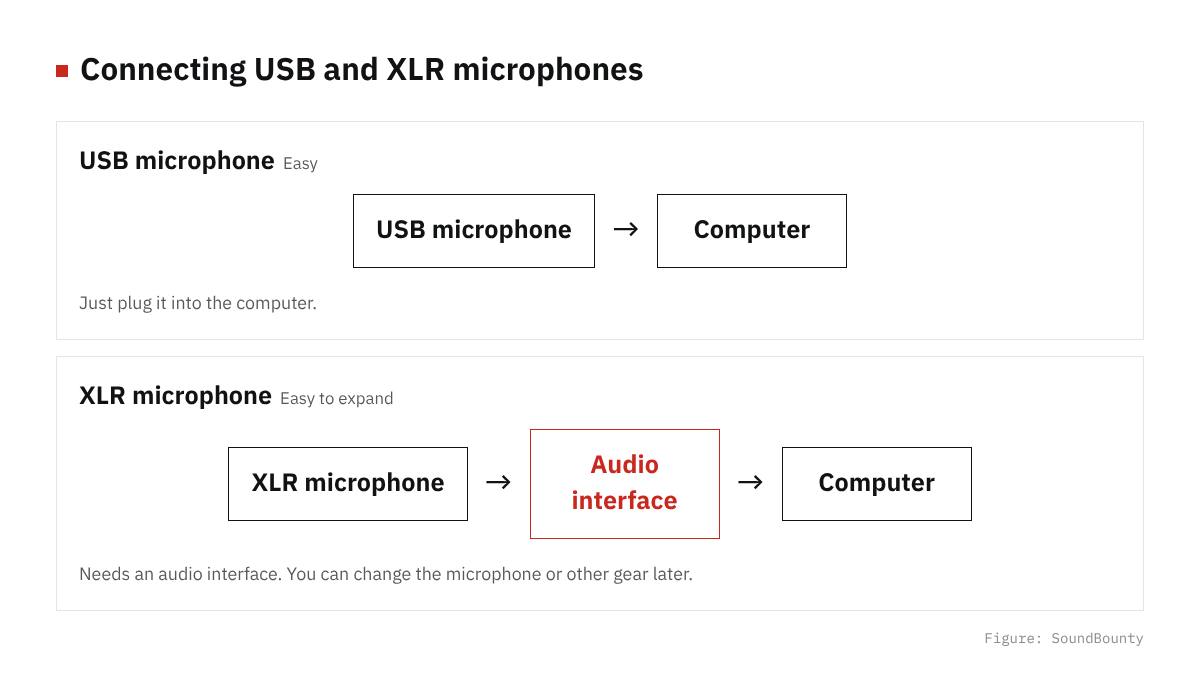
Figure: SoundBounty
Condenser microphones come as USB microphones, which connect straight to the computer, and XLR microphones, which connect through an audio interface.
| Item | USB microphone | XLR microphone |
|---|---|---|
| Connection | One USB cable to the computer | An XLR cable to an audio interface |
| Gear you need | The microphone (plus a stand) | A microphone, an audio interface (+48 V phantom power), an XLR cable and a stand |
| Expandability | Basically complete with one microphone | Easy to change or add microphones on the interface |
| Suited uses | Streaming, narration, online meetings, easy vocal recording | Serious recording of cover songs and instruments while you build up your gear |
The basic idea is: if you already have an audio interface or want to record guitar and so on, an XLR microphone; if you want to start as easily as possible or mainly stream, a USB microphone. Recently there are also models like the RODE NT1 5th Generation that can be used by both XLR and USB.
Points for choosing a condenser microphone
1. Pickup pattern
For home recording and streaming, a unidirectional (cardioid) pattern that picks up mainly sound from the front is the basic choice. It picks up less of the surrounding sound, such as room echo and air conditioners. A model whose pickup pattern can be switched, like the Blue Yeti, is handy for people whose use changes, such as solo streaming and conversations.
2. Your room
A condenser microphone is highly sensitive and picks up even small sounds. Conversely, it also easily records room echo and everyday noise. Before you switch to an expensive microphone, measures such as putting absorbing material or a reflection filter around the microphone, or recording in a room with curtains, are said to be effective.
3. Budget for peripheral gear
If you choose an XLR microphone, you also need an audio interface, an XLR cable, a microphone stand and a pop filter. Think about the total budget, not just the price of the microphone. How to choose an audio interface is explained in How to choose an audio interface.
4. For USB microphones, check the monitoring function
If you choose a USB microphone, check whether it has a headphone jack on the body so you can hear your own voice without delay (direct monitoring). The three USB microphones introduced here all have headphone output.
A list that compares only USB microphones is summarized in our USB microphone comparison.
A comparison of eight models
| Model | Connection | Features | Who it suits |
|---|---|---|---|
| audio-technica AT2020 | XLR | Unidirectional, 144 dB maximum input sound pressure. The standard entry-level XLR condenser | People who have an interface and are buying their first microphone |
| audio-technica AT2020USB-X | USB-C | 24-bit/96 kHz, headphone output, touch mute | People who want to start streaming and narration easily |
| Blue Yeti | USB | Four switchable pickup patterns (cardioid, omni, bidirectional and stereo), headphone output | People who want one microphone for both solo streaming and conversations |
| RODE NT-USB+ | USB | 24-bit/48 kHz, RODE’s Revolution Preamp, headphone output | People who want to record vocals and instruments by USB too |
| audio-technica AT4040 | XLR | Large diaphragm, 80 Hz low-cut, pad, shock mount included | A second vocal microphone, or for instruments too |
| RODE NT1 5th Generation | XLR / USB-C | Self-noise of 4 dBA (published), 32-bit float recording over USB | People who start with USB and want to move to XLR in the future |
| SONY C-80 | XLR | Unidirectional. A Sony condenser said to suit recording vocals, instruments and voice content at home | People who want to raise the quality of vocal recording a notch |
| Neumann TLM 102 | XLR | A compact large-diaphragm microphone, unidirectional, 144 dB maximum sound pressure | Intermediate to advanced users who want a studio microphone from a standard brand at home |
How to choose by level
Entry: the AT2020 or AT2020USB-X
If you already have an audio interface, the XLR AT2020 is the standard. If you do not have an interface, the USB version in the same series, the AT2020USB-X, is an option. But once you pair the AT2020 with an entry-level audio interface, the total goes up, so it is good to decide by “will I also record guitar in the future?” and “will I replace the microphone?”.
Mid: top USB models
If you mainly stream and want to switch the pickup pattern, the Blue Yeti; if you also have vocal recording in mind, the RODE NT-USB+ are candidates. USB microphones are easy to connect, but you cannot replace only the microphone later.
Serious vocal recording
The AT4040 is a model with a large diaphragm, a low-cut and a pad that is said to be usable widely, from vocals to acoustic guitar and amp recording. The RODE NT1 5th Generation has both XLR and USB-C and supports 32-bit float recording over USB. You can start without an interface and use it by XLR later, so it suits people who want to build up their gear in stages. The SONY C-80 is a Japanese model designed for home studios.
Standard studio brand
The Neumann TLM 102 is a compact and relatively affordable model in the lineup of the long-established German microphone maker.
Frequently asked questions
Q. Which is better, a dynamic or a condenser microphone?
Generally, a condenser microphone is more sensitive and records delicate expression more easily, but it also picks up surrounding sound more easily. A dynamic microphone is less sensitive and tends to pick up little room echo and everyday noise. If you are recording only a streaming voice in a room where soundproofing and absorption are hard, a dynamic microphone is also worth considering. See Dynamic vs condenser microphones for details.
Q. Can I connect a USB microphone to an audio interface?
An ordinary USB microphone is designed to connect straight to the computer and cannot be connected to an interface’s microphone input. A model that also has an XLR output, like the NT1 5th Generation, can also be used through an interface.
Q. Do I need a pop filter?
To reduce the plosive pops of breath on “p” and “b” sounds, using a pop filter is common for recording vocals. You can buy one for a modest cost.
Q. What is phantom power?
It is the power for running a condenser microphone, supplied from the audio interface through the XLR cable. The interface has a switch such as “+48V” or “PHANTOM”. A USB microphone takes power from USB, so it is not needed.
Summary
As a basic rule, a USB microphone if you put ease first, and an XLR microphone if you want to record seriously while building up your gear. If unsure, the AT2020 (XLR) or AT2020USB-X (USB) is a good first microphone, and the NT1 5th Generation is a candidate if you want the strengths of both. The key is to think about the total budget, including the interface and acoustic treatment, not just the microphone itself.
Read next
- Microphone comparison
- Dynamic vs condenser microphones
- USB microphone vs XLR microphone plus interface
- Microphone distance and pop filters for cover songs


Comments