
Disclosure: This page may contain affiliate links. Prices were checked on the date shown and may change.
An introduction to Mastering The Mix FUSER, based on information from the maker and distributors: what it does, how to use it and who it may suit. It is not scored.
FUSER resolves conflicting channels by assisting you in adjusting volume balance, enhancing phase optimization, and implementing intelligent mid-side sidechain ducking
— Mastering The Mix official site
What is FUSER?
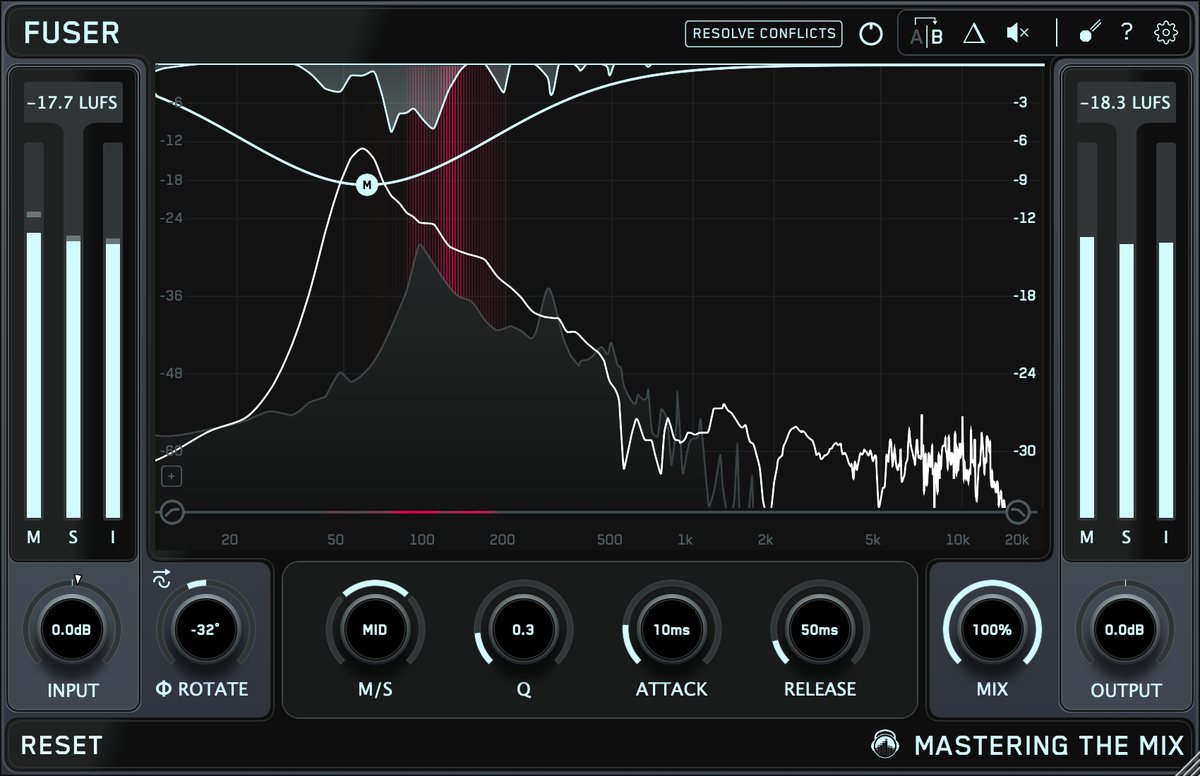
FUSER is a plug-in from Mastering The Mix for finding and sorting out clashes when several sounds compete for the same space, such as kick and bass or guitars and vocals. The maker presents it as a tool for situations where stacked layers bury a kick or crowd a vocal.
It combines three approaches: adjusting volume balance, optimising phase and using mid-side sidechain ducking. You place FUSER on one track and send the other to its sidechain input, and it locates the frequency regions where the two collide.
Conflict Detection shows where the clashes are, and the Resolve Conflicts button creates a starting point for the correction. The maker says it is meant to give a sensible first position, and for finer work you can create nodes manually and tune the parameters.
Setup is described as adding FUSER as the last plug-in in the chain and sidechaining the track you want to feature. The Phase Analyze feature automatically sets a phase rotation to limit cancellation when layering similar sounds such as a kick and a bass.
Key features
Conflict Detection
It shows where two tracks collide in the mid and side regions, so you can see where the crowding is before adjusting. That may help when you are not sure which band is the problem.
Resolve Conflicts
One button creates a starting position for the correction. The maker describes it as a way to find a point that does not overdo the processing, which you can then refine by hand.
Mid-side sidechain ducking
The overlapping region of the other track is reduced while the focus track sounds. The maker's example is clearing space on a bass only when the kick hits.
Phase Analyze
It sets a phase rotation automatically to minimise cancellation when you layer similar sounds. It may be useful for layered kicks and basses.
Input gain level match
An input-gain level-match pointer helps set the relative volume balance of the two tracks. It may serve as a base before dealing with the clashes.
Manual nodes
After the automatic pass you can create nodes yourself and tune the parameters. That suits anyone who wants the automatic result only as a starting point.
Specifications
| Item | Details |
|---|---|
| Plug-in formats | Mac: AU, VST3, AAX (Apple Silicon native) / Windows: VST3, AAX (all 64-bit) |
| Supported OS | Mac: OS X 10.15 or later / Windows 10 or later |
| AAX | Pro Tools 11 or later |
| Main functions | Conflict Detection, Resolve Conflicts, mid-side sidechain ducking, Phase Analyze, input gain level match |
| Inputs | The processed track plus a sidechain input |
What is included and system requirements
- FUSER plug-in (AU / VST3 / AAX)
- A free trial is offered (per the official page)
- Plugin Boutique's page mentions free gifts available with a purchase
How to use it
- Decide which two tracks clash, for example kick and bass.
- Insert FUSER as the last plug-in on the track you want to adjust.
- Send the track you want to feature to FUSER's sidechain input.
- Play and look at the Conflict Detection display to see the clashing regions.
- Press Resolve Conflicts to create a starting correction.
- If needed, add nodes manually and adjust the parameters.
- Use Phase Analyze to check phase and the input gain level match to check balance.
- Compare with the bypassed state.
Where it may come in handy
Sorting kick and bass
If you want to reduce the overlapping bass region as the kick hits, you might place FUSER on the bass with the kick as its sidechain.
Separating vocals and guitars
When a guitar competes with a vocal in the same range, you could sidechain the vocal and adjust the guitar.
Checking layered sounds
If you worry about cancellation when layering similar sounds, you might check the phase analysis first and then adjust.
As a starting point in a mix
You could use the automatic result as a first position and refine it by ear, rather than relying on it alone.
Who it may suit
- People who spend time sorting sounds that overlap in range, such as kick and bass
- Those who want to see the cause of muddiness visually
- Users who want an automatic starting point and then refine by ear
- Anyone concerned about phase cancellation in layered sounds
Good to know before you buy
- A sidechain input is required, so check how to route a sidechain in your DAW.
- When used through a Rent to Own plan or the Beatport Studio membership, an internet connection is needed every 30 days to validate the licence (per Plugin Boutique).
- The automatic correction is a starting point and results depend on the material.
Price
Please check the official page for the price.
More of the same kind
Other introduction articles of the same kind.
- UJAM Finisher VOODOO
- Solid State Logic SSL Fusion Vintage Drive
- NUGEN Audio Aligner
- Waves TRACT System Calibration
- Sonarworks SoundID VoiceAI
- Waves Clarity Vx DeReverb Pro
We have introduced 6 other products from Mastering The Mix.
- Mastering The Mix REFERENCE 3
- Mastering The Mix FASTER MASTER
- Mastering The Mix ANIMATE
- Mastering The Mix STEREOVAULT
- Mastering The Mix BASSROOM
See the full list in Product database: Effects.
Sources: masteringthemix.com pluginboutique.com (checked 2026-10-27)










Comments