
A DAW is software for recording, composing and mixing on a computer. In cover songs and home recording, you record the vocal in the DAW, tidy pitch and timing, and finish it together with the backing track. In this article we compared seven main DAWs using the makers’ official information.
Disclosure: This article contains affiliate links. If you buy through them, SoundBounty may earn a commission at no extra cost to you. Prices are as of the date we checked them and can change.
In short: what to look at for cover songs and home recording
- If you want to fix the pitch of a recorded vocal, one that can edit vocal pitch inside the DAW is handy. Among the seven in this article, the official pages of Cubase (Pro and Artist), Logic Pro, Ableton Live 12 and Fender Studio Pro 8 list pitch editing or pitch correction (in FL Studio, Signature Bundle and above).
- If you want to join the best parts of several takes you sang, a function called “comping” speeds up the work. It is listed on the official pages of Cubase (Pro and Artist), Logic Pro, Ableton Live 12, REAPER and Bitwig Studio.
- If you use only a Mac, Logic Pro is also a candidate. If you want to use it on both Windows and Mac, choose from those other than Logic Pro.
- If you first want to try without spending money, you can start with products that have a free trial or an evaluation period (the table below). Free DAWs are summarized in Free DAWs you can use.
A comparison of seven main DAWs
| DAW | Supported OS | Price (Plugin Boutique, US dollars) | Free trial | Vocal pitch editing | Take comping | Bundled instruments and material |
|---|---|---|---|---|---|---|
| Cubase Pro 15 | Windows and Mac | $579.99 (Plugin Boutique) | Trial available | VariAudio included | Yes | 11 instruments, 3,000+ sounds, 20 GB+ of samples |
| Cubase Artist 15 | Windows and Mac | $329.99 (Plugin Boutique) | Trial available | VariAudio included | Yes | 11 instruments, 2,600+ sounds, 20 GB+ of samples |
| Cubase Elements 15 | Windows and Mac | $99.99 (Plugin Boutique) | Trial available | No | No | 7 instruments, 1,500+ sounds, 20 GB+ of samples |
| Logic Pro | Mac only (Apple silicon) | A one-time purchase on the Mac App Store, and a subscription through Apple Creator Studio (not sold at Plugin Boutique) | A 30-day free trial of Apple Creator Studio | Flex Pitch and real-time pitch correction | Yes (Quick Swipe Comping) | Sound library and producer packs |
| Ableton Live 12 (Standard / Suite) | Windows and Mac | Not sold at Plugin Boutique | Free trial available | Auto Shift (real-time pitch correction, from Live 12.1) | Yes | Standard 38 GB+ / Suite 71 GB+ (Intro 5 GB+) |
| FL Studio (Producer Edition) | Windows and Mac (one license for both) | Not sold at Plugin Boutique | Trial available (no time limit; saved projects cannot be opened until you buy) | No (Newtone and Pitcher are in Signature Bundle and above) | Could not be confirmed on the official page | 93 instruments and effects (Producer Edition) |
| Fender Studio Pro 8 | Windows 10 22H2 / 11 22H2 or later, macOS 13.5 or later | $199.99 (Plugin Boutique, the one-time “Perpetual” version) | 30-day trial available | Vocal Tune (pitch correction for vocals) | Could not be confirmed on the official page | 9 instruments, 39 guitar amps, 18 bass amps |
| REAPER | Windows, Mac and Linux | Not sold at Plugin Boutique | 60 days with all functions available for evaluation | Could not be confirmed on the official page | Yes (Swipe Comping) | Could not be confirmed on the official page |
| Bitwig Studio | Windows, Mac and Linux | $399.00 (Plugin Boutique, Bitwig Studio 6) | Check on the official site | No note-by-note vocal correction is listed | Yes | More than 140 devices including instruments and effects |
The prices are regular prices in US dollars shown on Plugin Boutique on October 10, 2026. We do not list a price for DAWs that Plugin Boutique does not sell. “Could not be confirmed on the official page” does not mean the function is absent; it means we could not verify it on the official product page.
Points for choosing
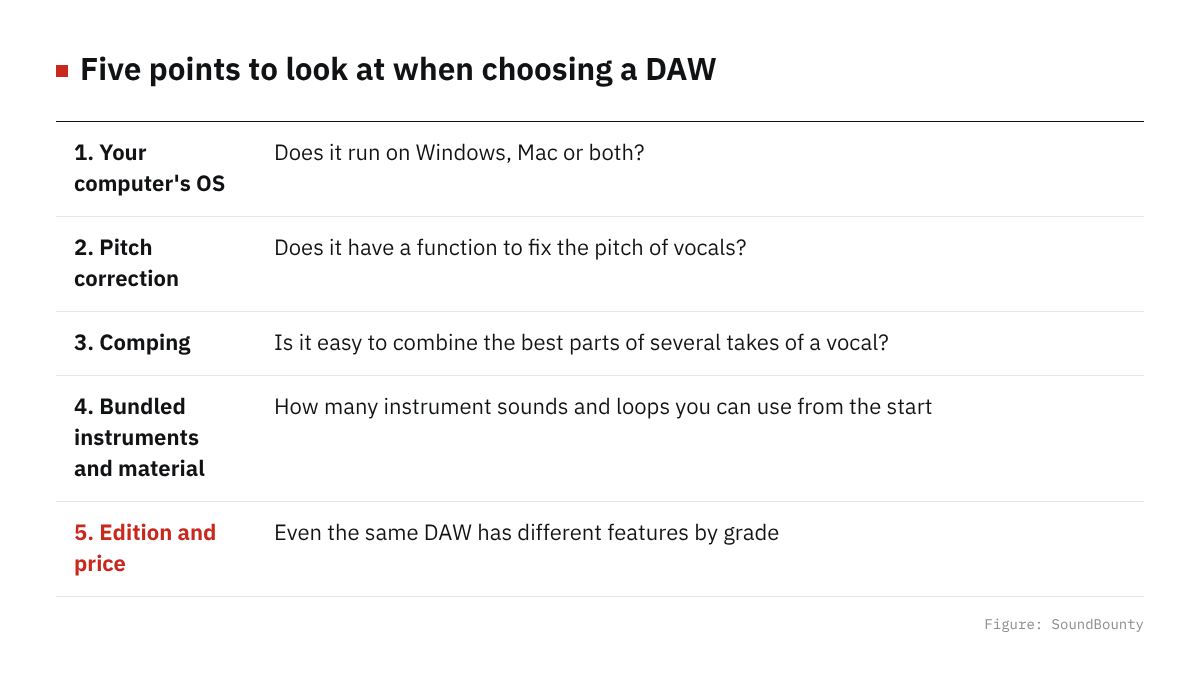
Figure: SoundBounty
1. Your computer’s OS
Logic Pro is Mac only (it needs a Mac with Apple silicon). On a Windows computer, you choose from Cubase, Ableton Live, FL Studio and others. FL Studio is officially stated to be usable on both Windows and Mac with one license.
2. Can you fix the pitch of a vocal?
In cover songs, there are often scenes where you want to tidy the pitch of a recorded vocal a little. If the DAW can edit pitch, like Cubase’s VariAudio (Pro and Artist) or Logic Pro’s Flex Pitch, you do not need to prepare separate software. If you use dedicated pitch correction software, also refer to our pitch correction plug-in comparison.
3. Ease of combining takes (comping)
Comping is singing the same part several times and joining only the best bits. In recording a cover song, the speed of this work greatly affects the time to the finish.
4. Bundled instruments and material
If you make the backing track yourself, the amount of bundled instruments and loops also matters. If you only put your singing on a backing track that was provided, you are not troubled by few bundled instruments.
5. Edition and price
Many DAWs are split into several editions with different features. For example, in Cubase, Elements does not have pitch editing (VariAudio) or take comping, and Artist and Pro do. We recommend checking in the maker’s comparison table which edition includes the functions you want to use, before you choose.
Frequently asked questions
Q. Which DAW suits cover songs best?
We cannot name just one, but using whether recording, pitch editing and comping are all there as a guide makes it easier to choose. Among the seven in this article, Cubase (Pro and Artist), Logic Pro and Ableton Live 12 had all three confirmed on their official pages.
Q. Can I do cover songs with a free DAW?
Yes. The basics of recording and mixing can be done with a free DAW. For pitch correction and the like, you can also make up for it with another plug-in.
Q. Is the DAW that comes with an audio interface enough?
Bundled versions (such as Cubase AI and LE) have limits on the number of tracks and on features. You can start with the bundled version and move up to a higher edition if it falls short.
Read next
- Free DAWs you can use
- What you need to start DTM
- Basic steps for recording vocals at home
- Pitch correction plug-in comparison


Comments