
For people who want to start DTM but do not know what to buy first, we sorted the gear you want at minimum into “required” and “nice to have”. We also give examples of a minimal kit for three levels: light, standard and advanced. If you already have a computer or headphones, subtract that from your budget. This article does not give prices; check the current price at the store you buy from.
Disclosure: This article contains affiliate links. If you buy through them, SoundBounty may earn a commission at no extra cost to you. Information is as of the date we checked it and can change.
A list of what you need to start DTM
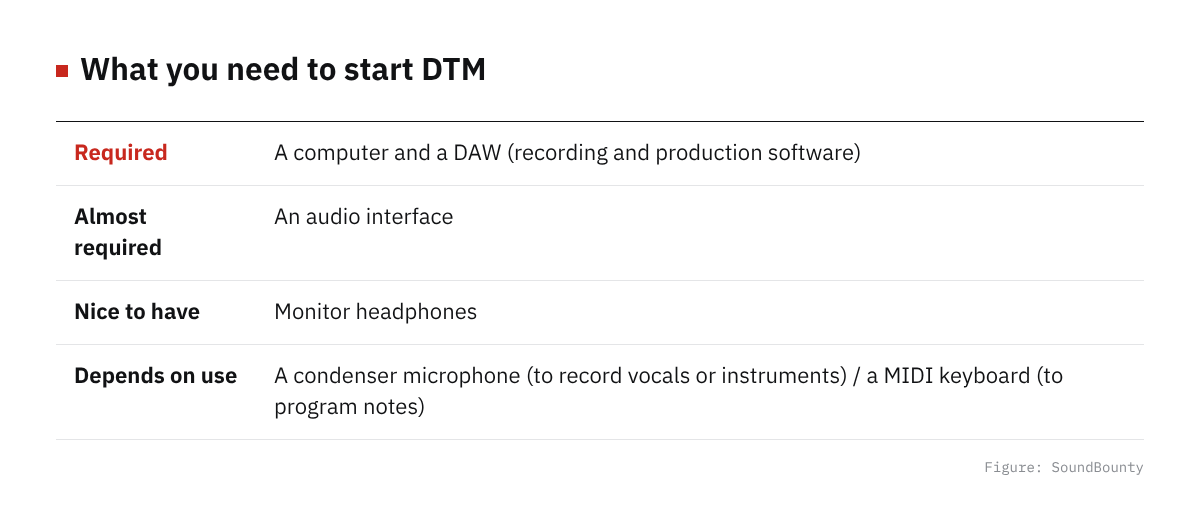
Figure: SoundBounty
Required: a computer
DTM is basically done in a DAW (production software) on a computer. Detailed advice on choosing a new computer is outside this article, but as a guide, the official system requirements of Cubase 15, one of the DAWs, are 8 GB or more of memory and, for disk space, 84 GB with everything installed (1.5 GB for a minimal setup) (checked September 27, 2026). If you already have an ordinary laptop or desktop bought within the last few years, in many cases you can start using it as it is. If you consider buying a new one, choosing a model with 16 GB or more of memory and an SSD gives you headroom.
Required: a DAW (production software)
A DAW is the software that is the foundation for making songs. There are several free DAWs, and we compare them in another article, Free DAWs you can use. Even if you want to use a paid DAW from the start, many of the audio interfaces described below come with a lite version of a DAW, so you can sometimes start producing without extra cost.
Almost required: an audio interface
Sound can come out of the computer’s built-in microphone and earphone jacks alone, but if you want to record microphones and instruments cleanly, or monitor with little latency (delay in sound), you need an audio interface. How to choose is explained in detail in How to choose an audio interface.
Nice to have: monitor headphones
In an environment where you cannot play speakers loudly, monitor headphones become the center of production. The difference between closed-back and open-back and so on is explained in How to choose monitor headphones.
If you record vocals or live instruments: a condenser microphone
If you focus on programming, you can put it off, but if you want to record cover songs or acoustic instruments, you need a condenser microphone. The difference between USB and XLR microphones is summarized in How to choose a condenser microphone.
If you program notes: a MIDI keyboard
You can program melodies and chords with just a mouse, but if you want to enter them by playing keys, a MIDI keyboard makes it more efficient. For the first one, a bus-powered 25 to 49-key model that takes power from the computer’s USB port is enough.
Examples of a minimal kit for each level
These are examples, not recommendations tied to a price. Check the current price of each product at the store you buy from, and subtract what you already own.
Light: first, make sound and get your hands on it
- DAW: a free DAW, or the Cubase AI that comes with the Yamaha UR12
- Audio interface: Yamaha UR12 (one microphone input and one guitar input, with Cubase AI included)
- Headphones: AKG K240 MKII, a closed-back-style monitor for entry-level use
With just these, you can start programming and simple singing-and-guitar recordings. Add a microphone or a MIDI keyboard when you need one.
Standard: with recording and streaming in mind
- Audio interface: Focusrite Scarlett 2i2 4th Gen (two microphone preamps)
- Headphones: Sennheiser HD 280 PRO, a closed-back model suited to recording
- Condenser microphone: Audio-Technica AT2020 (XLR), a first condenser microphone
- MIDI keyboard: a 49-key bus-powered model such as the M-Audio Keystation 49 MK3
This covers recording cover songs, singing with guitar and simple programming. The Scarlett series has a mechanism that lets you choose and download from several DAWs as a purchase bonus, so check the eligible DAWs on the official site before you buy.
Advanced: aiming for tracking through effects and serious sound quality
- Audio interface: Universal Audio Apollo Solo USB Heritage Edition
- Headphones: a higher-end closed-back monitor (compare in our monitor headphone comparison)
- Condenser microphone: Audio-Technica AT2020 (XLR)
The Apollo Solo USB Heritage Edition is a model that lets you record while applying compressor and preamp emulations with its built-in DSP, but the USB version is for Windows 10/11 only and does not support macOS, so Mac users should consider another model (alternatives are introduced in How to choose an audio interface). If your budget allows, adding a MIDI keyboard here, such as the Novation Launchkey Mini 25 MK4, sets up the programming environment too.
If you are unsure what to buy first
If you are unsure about priorities, we recommend this order: (1) get used to the controls with a free DAW, (2) raise sound quality and ease of use with an audio interface and headphones, then (3) add a microphone or MIDI keyboard to suit your production style. If singing or singing with guitar is your center, buy the microphone first; if composing by programming is your center, buy the MIDI keyboard first, and it will help your actual production at once.
Frequently asked questions
Q. Can I do DTM on just a smartphone or tablet?
There are free and paid mobile DAW apps, and simple programming is possible. But for mixing with several plug-ins, or serious recording with an external microphone or instruments, a computer DAW combined with an audio interface suits better.
Q. Where should I spend money first?
It depends on your production style, but if unsure, putting “it runs stably on the computer” first, then the audio interface, and finally peripherals such as a microphone and MIDI keyboard, is said to be the allocation least likely to fail. Even if you replace headphones or a microphone later, the production data you made until then is not wasted.
Q. Is it okay to buy used or outlet items?
Audio interfaces and MIDI keyboards can sometimes be perfectly usable even as older models or outlet items. But the warranty period and driver support may differ from new ones, so check the store’s warranty conditions before you buy.
Summary
The minimum you need to start DTM is a computer and a DAW, and the next priority is an audio interface. Adding headphones and, as needed, a microphone or MIDI keyboard lets you widen your setup without strain. As a guide, light is a simple setup of just the UR12 and headphones; standard adds a microphone and a MIDI keyboard so you can both record and program; and advanced aims at serious tracking with the DSP-equipped Apollo Solo. Prices change, so check the latest price at each store before you buy.


Comments