
A cover-song mix has a lot to do, and it is easy to wonder where to start. This article guides you through the whole flow from recording to export in seven steps. You can read the detailed method for each step in its own guide.
Disclosure: This article contains affiliate links. If you buy through them, SoundBounty may earn a commission at no extra cost to you. Information is as of the date we checked it and can change.
Key points
- Mixing is the work of tidying three things: balance, processing and placement (FabFilter Learn).
- Splitting a cover-song mix into seven steps makes it harder to get lost.
- The order is a common starting point. You can go back to an earlier step and fix things as you listen.
- The vocal is the lead, but how it sounds is decided by its relationship with the backing track.
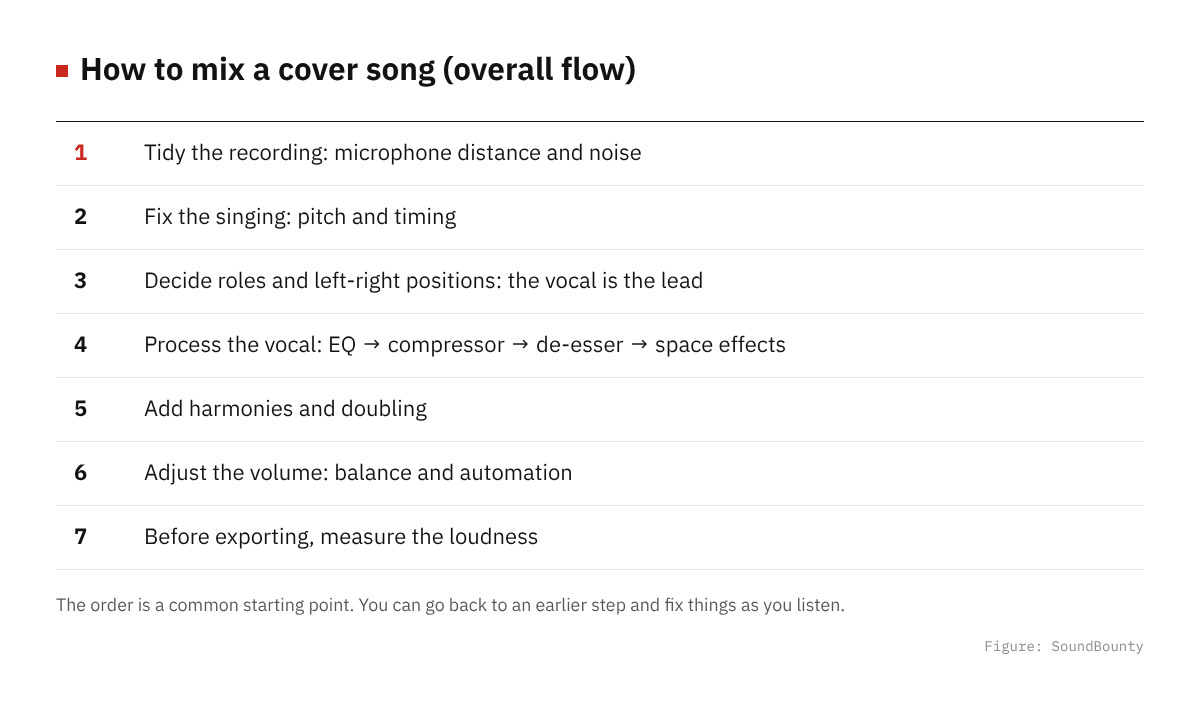
Figure: SoundBounty
The three things you do in a mix
FabFilter explains the basic actions of a mix in three parts.
- Balance: decide the volume ratio of each part.
- Processing: with EQ, compressor and so on, make each part into a sound that can do its job.
- Placement: decide the left-right position and the depth.
It is explained that all of these are work to make the listener feel something. The seven steps below rearrange these three in the order of a cover song.
Source: FabFilter Learn
Preparation before you start
For a cover song, you start by lining up the backing track (the accompaniment audio) and the audio of your recorded vocal in a DAW (recording and production software). How to choose a DAW is explained in How to choose a DAW, and if you want to start for free, in Free DAWs you can use.
Plug-ins are add-on software used inside the DAW. How to install and authorize a plug-in you bought is explained in How to install plug-ins you bought in a sale or got as a free giveaway.
FabFilter compares mixing to cooking. The recorded sound is the ingredient. The better the ingredient, the easier the finish. That is why the recording stage before the mix matters.
Step 1: Tidy the recording
How good the mix is depends on the quality of the recording. FabFilter also explains that the better the recording, the easier the mixing work.
- Set the microphone distance and pop filter: Microphone distance and pop filter for cover songs
- Recognize and reduce noise: Causes and fixes for noise in a cover-song recording
- Set the recording input level: How to set the recording input level (gain)
- Basic recording steps: Basic steps for recording vocals at home
Step 2: Fix the singing
Fix drift in pitch and rhythm only where needed. If you overdo it, it can sound mechanical.
- Fix the pitch: How to do pitch correction on a cover song
- Fix rhythm drift: How to do timing correction on vocals
Step 3: Decide roles and left-right positions
Decide the role of each part, such as the vocal as lead and the backing as support. FabFilter recommends deciding the left-right positions before deciding the volume.
- How to decide roles, positions and volume: How to balance the vocal and the backing track
Step 4: Process the vocal
On the vocal, apply EQ, compressor, de-esser, and reverb and delay in the commonly used order. The reason for the order is explained in the next article.
- Order of plug-ins: The order of plug-ins for a cover-song mix
- Tidy muddiness and harshness: How to EQ vocals
- Even out the volume of the voice: How to use a compressor on vocals
- Reduce the harshness of “s” sounds: How to use a de-esser on vocals
- Add ambience to blend it in: How to use reverb and delay on vocals
Which plug-ins to use is compared with scores based on official information in our list of comparisons. If you want to start for free, see Free plug-ins for a cover-song mix.
Step 5: Add harmonies and doubling
When you want thickness and width in the vocal, add harmonies and doubling. Keep the added voices quieter than the main vocal so they blend in.
- How to make harmonies and doubling: How to make harmonies and doubling for a cover song
Step 6: Adjust the volume
Including the added voices and processing, look at the balance once more. FabFilter explains that fixing one part changes how the other parts sound, so going back to fix things is normal.
Parts of the song where the balance is off are fixed with automation. The details are explained in the balance article.
Step 7: Measure the loudness before you export
Before exporting, measure the loudness of the whole song. Also check the destination’s guidelines.
- Loudness basics and how to measure it: The basics of loudness for a cover song
To avoid overdoing it in a mix
- Change one thing at a time: if you touch many things at once, you cannot tell what worked.
- Compare on and off: check whether the processed sound matches the purpose.
- Listen with the backing track: listening to the vocal alone makes you overdo the fixes.
- Rest your ears: listening for a long time dulls your judgment. Leave some time and listen again.
Where to look again when you get stuck
- The vocal is buried: review Step 3 (roles and positions) and the EQ in Step 4.
- Only the vocal stands apart: review the amount of reverb and the balance.
- “S” sounds are harsh: review the de-esser. Also check the microphone position.
- The volume is uneven: review the compressor and the automation.
- Noise bothers you: go back to Step 1.
Frequently asked questions
Q. Do the seven steps have to be in this order?
It is not a rule. It is a common starting point. FabFilter also explains that going back to an earlier decision and fixing it is a normal part of mixing.
Q. Do I need all of the plug-ins?
No. The basic approach is to use only the plug-ins that fix your problems.
Q. Where should a beginner start reading?
If you are unsure about recording, start from Step 1. If you are confident about recording, reading “How to balance” and “The order of plug-ins” first makes it easier to grasp the whole.
Q. Are there fixed settings in numbers?
They change with the voice, the microphone and the song, so we do not give fixed values. Decide by listening.
Read next
- How to balance the vocal and the backing track
- The order of plug-ins for a cover-song mix
- Basic steps for recording vocals at home
- What you need to start DTM


Comments